Group and guests
Your reader can play a single character or a whole group. You play together by invitation link, with an account or as a guest.
One person or a group
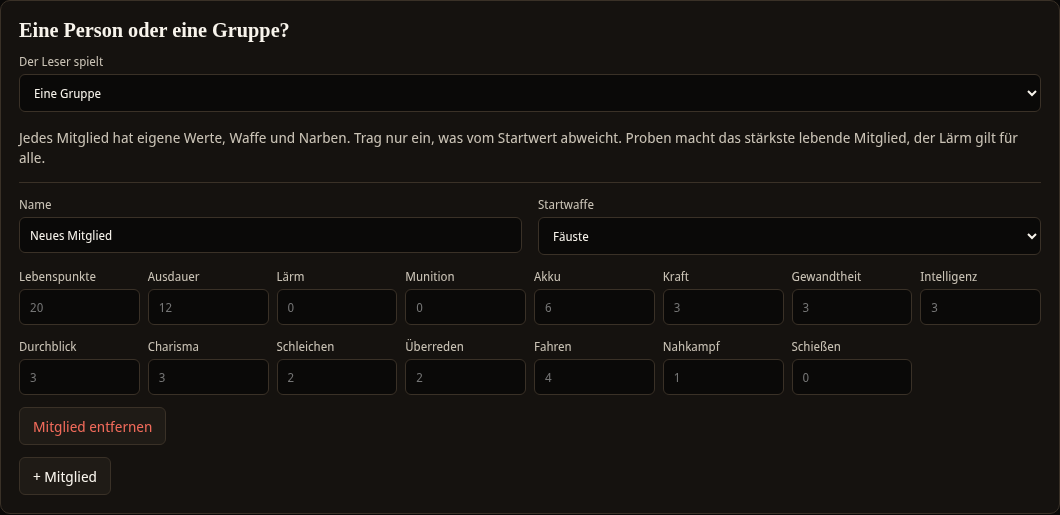
In the rule set you decide whether your reader plays a single person or a group. To do this, open the One person or a group? card on the Rule set tab and choose either One person or A group under The reader plays. The setting applies to all volumes of the series.
Creating members
With A group the + Member button appears. Each member has:
- a Name,
- a Starting weapon,
- stats of their own. Enter only stats that differ from the starting value. All empty fields keep the starting value, which is shown as a grey number.
With Remove member you take a member out again. A group without members is reported by the validation as an error: Group mode is on, but the group has no members.
What changes in the game
- Checks: The strongest living member makes the check. Under Who tries it? in the choice you can choose The leader instead. The leader is the member who is currently selected.
- Effects: For an effect that changes a stat, you choose under For whom between Leader and Everyone in the group.
- Combats: In the test play you choose the attacking member under Who attacks.
- Noise: Noise applies to the whole group.
- Test play and phone: Both show a button for each member. With a click you switch the selected member. In the test play it shows the name and the number of health points.
More about checks and combats can be found under Rules and random table from 0 to 9.
Playing together with an invitation link
You can play a volume together with others. Everyone sees the same story and the same choices, each person on their own device.
Starting a session
- Open the volume in the editor and select Play together.
- The volume must have no errors in the validation. Otherwise you see The volume still has errors in the validation and cannot be played.
- If you have brought a character from an earlier volume, enter their character code.
- Select Start session. The version of the volume at this moment is played. Later changes do not affect the running session.
Inviting players
On the session page there is the Invite players card. Under Role, choose whether the person should Play or Only watch, and then Create invitation link. With Copy link you put it on the clipboard and send it to the person. The link is valid for seven days and invites up to seven people. You see it only once. If you need it again, create a new one.
Joining
Whoever opens the link has two options:
- Join as a guest: The person enters their name and joins without an account. The guest belongs only to this one session.
- With an account: The person selects Sign in or Create account and then enters the session. They appear under the name of their account.
If the link is invalid or has expired, you see This invitation is invalid or has expired. Ask the person who invited you for a new link.
In the session
At the top are the Players with name and role. You recognise your own name by (you). Below the text it shows who played last, for example "Tilda made a choice." Spectators see everything but make no choices. As the owner you remove individual people with Remove and end the session for everyone with End session. Both ask first.
Playing at the table
Whoever plays with your book needs no account for it. Every person who scans the QR code from the book or knows the address of the phone page can use the phone page. They have their own status on their phone. At the table every person can therefore use their own phone, even if only one book lies on the table. How the phone page works is described under Phone and QR code.